NeonGlow Standalone ESP32 Web-Based Smart Control Panel
Fiqra Putra Lesmana
Author
An aesthetic, high-performance dark-mode web dashboard hosted directly inside an ESP32 to control room devices locally no external servers.
Things used in this project
• Hardware components
ESP32
4-Channel SPDT Relay
• Software apps
Arduino IDE
Story
Let’s be real: a lot of DIY smart home setups overcomplicate things. They often require third-party servers, confusing cloud configurations, or constant internet access just to turn on a light. I wanted to build something much leaner, entirely private, and lightning-fast, without sacrificing a clean, modern UI/UX.
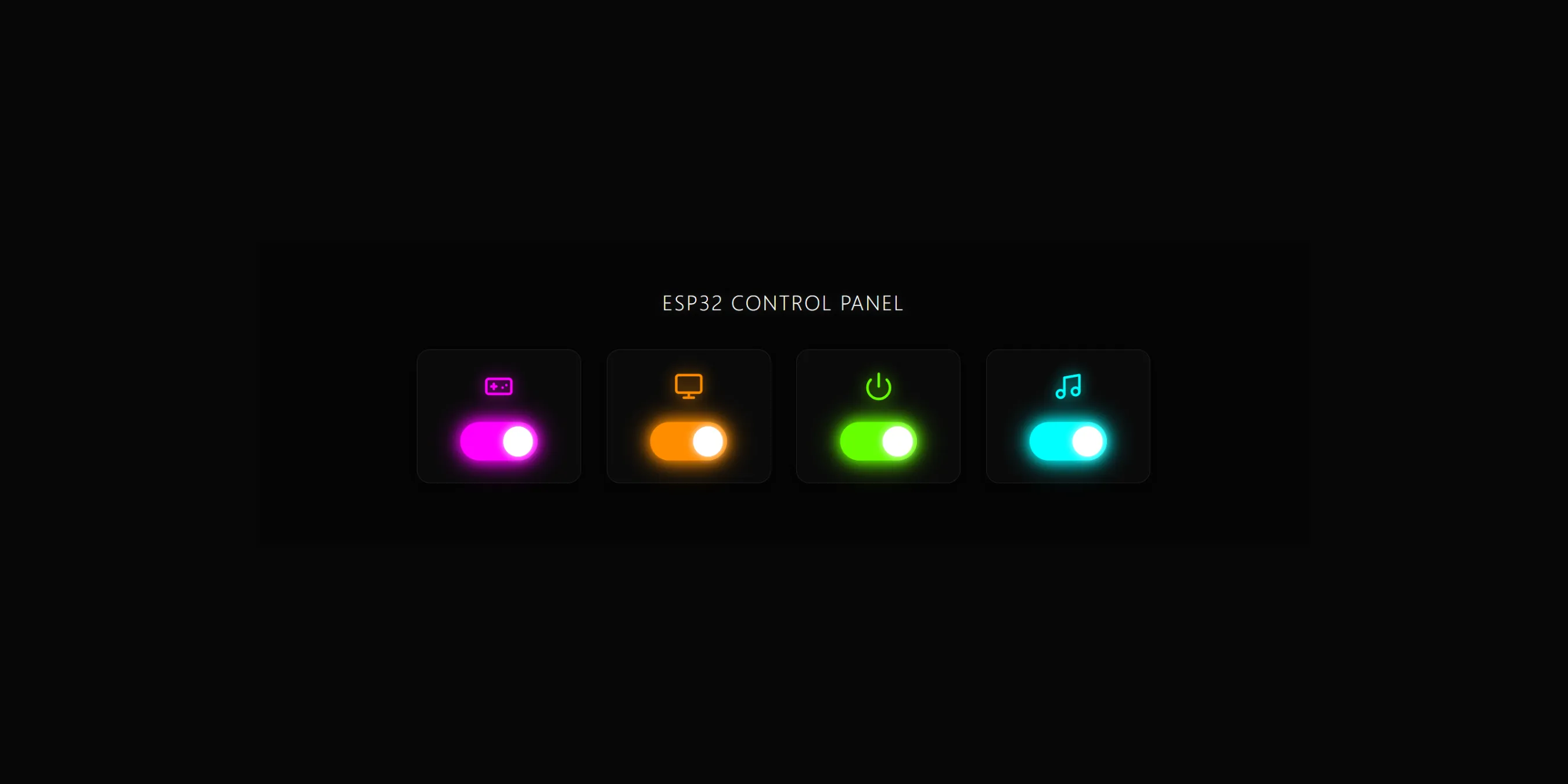
The result is this project: a room device control panel that runs 100% on a local network. That entire sleek, dark-mode dashboard with the glowing neon toggles you see in the interface design? It’s stored and served straight from the ESP32’s flash memory. There is no separate backend server, no Raspberry Pi middleman, and no complex deployment—everything is neatly packed into a single .ino file.
Once the ESP32 boots up and connects to the house Wi-Fi, I just open its local IP address on my phone or laptop browser, and the interactive dashboard is instantly ready. When a toggle is flipped, the web page sends a lightning-fast HTTP request over the local network to the ESP32, instantly triggering the relay module to power up my gaming PC, monitors, main power, or audio system.
This build is my way of proving that with a bit of code optimization, you can serve a premium, responsive web interface right out of a tiny microcontroller. It’s the perfect DIY setup for anyone who values privacy, zero latency, and an interface that actually looks good on a screen!.
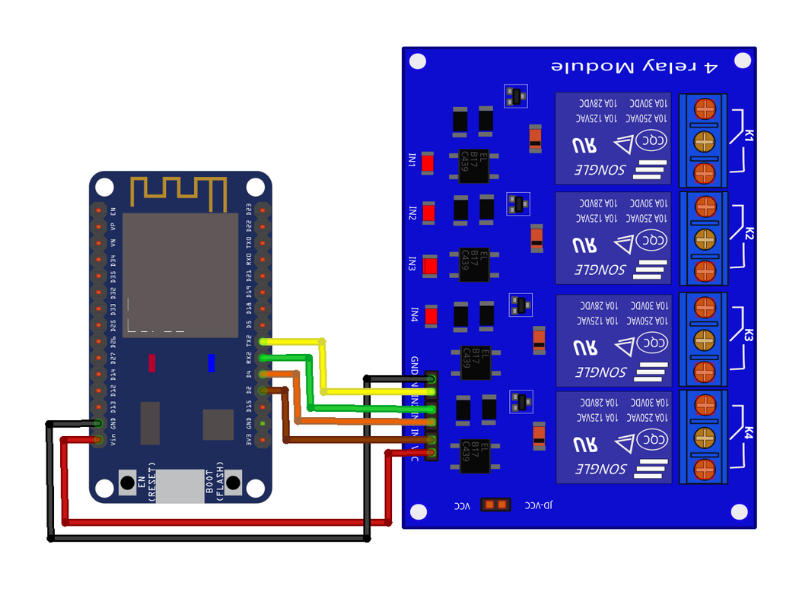
Schematics
ESP32_Local_Wiring_Diagram.png
Code
ESP32_Local_Web_Control.ino
#include <WiFi.h>
#include <WebServer.h>

// Replace with your WiFi SSID and Password
const char* ssid = "*****";
const char* password = "*****";

WebServer server(80);

// 4 Pins for each LED/Relay.
// You can change this according to the ESP32 GPIO pins you are using.
const int ledPins[4] = {2, 4, 16, 17};

void handleRoot() {
  String html = "<!DOCTYPE html><html>";
  html += "<head><meta name=\"viewport\" content=\"width=device-width, initial-scale=1\">";
  html += "<title>Smart Home Control</title>";
  html += "<style>";
  html += "body { background-color: #050505; display: flex; flex-direction: column; align-items: center; justify-content: flex-start; min-height: 100vh; margin: 0; font-family: 'Segoe UI', Tahoma, Geneva, Verdana, sans-serif; color: white; padding: 40px 20px; box-sizing: border-box; }";

  // Headline styling
  html += "h1 { margin-bottom: 40px; letter-spacing: 2px; font-weight: 300; text-align: center; text-transform: uppercase; font-size: 24px; color: #fff; text-shadow: 0 0 10px rgba(255,255,255,0.2); }";

  html += ".grid { display: flex; flex-direction: column; align-items: center; gap: 20px; }";
  html += "@media (min-width: 768px) { .grid { flex-direction: row; justify-content: center; gap: 30px; } }";
  html += ".toggle-box { border: 1px solid #222; border-radius: 15px; padding: 25px 50px; display: flex; flex-direction: column; align-items: center; background: #0a0a0a; box-shadow: 0 4px 15px rgba(0,0,0,0.8); }";
  html += ".icon { margin-bottom: 20px; transition: .4s; }";
  html += ".icon svg { width: 35px; height: 35px; stroke: #555; fill: none; stroke-width: 2; stroke-linecap: round; stroke-linejoin: round; transition: .4s; }";

  // Specific colors for each icon when active
  html += ".magenta.active svg { stroke: #ff00ff; filter: drop-shadow(0 0 8px #ff00ff); }";
  html += ".orange.active svg { stroke: #ff8c00; filter: drop-shadow(0 0 8px #ff8c00); }";
  html += ".green.active svg { stroke: #66ff00; filter: drop-shadow(0 0 8px #66ff00); }";
  html += ".cyan.active svg { stroke: #00ffff; filter: drop-shadow(0 0 8px #00ffff); }";

  // Base styling for toggle
  html += ".switch { position: relative; display: inline-block; width: 90px; height: 45px; }";
  html += ".switch input { opacity: 0; width: 0; height: 0; }";
  html += ".slider { position: absolute; cursor: pointer; top: 0; left: 0; right: 0; bottom: 0; background-color: transparent; border: 2px solid #333; transition: .4s; border-radius: 45px; box-shadow: inset 0 0 5px rgba(0,0,0,0.5); }";
  html += ".slider:before { position: absolute; content: \"\"; height: 35px; width: 35px; left: 3px; bottom: 3px; background-color: #fff; transition: .4s; border-radius: 50%; box-shadow: 0 0 5px rgba(255,255,255,0.3); }";

  // Slider right movement
  html += "input:checked + .slider { border-color: transparent; }";
  html += "input:checked + .slider:before { transform: translateX(45px); box-shadow: 0 0 10px #fff; }";

  // Colorful glow for each toggle
  html += ".switch.magenta input:checked + .slider { background-color: #ff00ff; box-shadow: 0 0 15px #ff00ff, 0 0 30px #ff00ff; }";
  html += ".switch.orange input:checked + .slider { background-color: #ff8c00; box-shadow: 0 0 15px #ff8c00, 0 0 30px #ff8c00; }";
  html += ".switch.green input:checked + .slider { background-color: #66ff00; box-shadow: 0 0 15px #66ff00, 0 0 30px #66ff00; }";
  html += ".switch.cyan input:checked + .slider { background-color: #00ffff; box-shadow: 0 0 15px #00ffff, 0 0 30px #00ffff; }";

  html += "</style></head>";
  html += "<body>";

  // Headline
  html += "<h1>ESP32 Control Panel</h1>";

  html += "<div class=\"grid\">";

  String colors[] = {"magenta", "orange", "green", "cyan"};
  String icons[] = {
    "<svg viewBox=\"0 0 24 24\"><rect x=\"2\" y=\"6\" width=\"20\" height=\"12\" rx=\"2\" ry=\"2\"></rect><line x1=\"6\" y1=\"12\" x2=\"10\" y2=\"12\"></line><line x1=\"8\" y1=\"10\" x2=\"8\" y2=\"14\"></line><line x1=\"15\" y1=\"13\" x2=\"15.01\" y2=\"13\"></line><line x1=\"18\" y1=\"11\" x2=\"18.01\" y2=\"11\"></line></svg>", // Gamepad (Magenta)
    "<svg viewBox=\"0 0 24 24\"><rect x=\"2\" y=\"3\" width=\"20\" height=\"14\" rx=\"2\" ry=\"2\"></rect><line x1=\"8\" y1=\"21\" x2=\"16\" y2=\"21\"></line><line x1=\"12\" y1=\"17\" x2=\"12\" y2=\"21\"></line></svg>", // Monitor (Orange)
    "<svg viewBox=\"0 0 24 24\"><path d=\"M18.36 6.64a9 9 0 1 1-12.73 0\"></path><line x1=\"12\" y1=\"2\" x2=\"12\" y2=\"12\"></line></svg>", // Power/Light (Green)
    "<svg viewBox=\"0 0 24 24\"><path d=\"M9 18V5l12-2v13\"></path><circle cx=\"6\" cy=\"18\" r=\"3\"></circle><circle cx=\"18\" cy=\"16\" r=\"3\"></circle></svg>" // Music (Cyan)
  };

  for(int i=0; i<4; i++) {
    bool state = digitalRead(ledPins[i]);
    html += "<div class=\"toggle-box\">";
    html += "<div class=\"icon " + colors[i] + (state ? " active" : "") + "\" id=\"icon" + String(i) + "\">" + icons[i] + "</div>";
    html += "<label class=\"switch " + colors[i] + "\">";
    html += "<input type=\"checkbox\" onchange=\"toggleLED(" + String(i) + ", this)\" " + (state ? "checked" : "") + ">";
    html += "<span class=\"slider\"></span>";
    html += "</label>";
    html += "</div>";
  }

  html += "</div>";

  html += "<script>";
  html += "function toggleLED(id, cb) {";
  html += "  fetch('/led?id=' + id + '&state=' + (cb.checked ? 'on' : 'off'));";
  html += "  var icon = document.getElementById('icon' + id);";
  html += "  if(cb.checked) { icon.classList.add('active'); }";
  html += "  else { icon.classList.remove('active'); }";
  html += "}";
  html += "</script>";
  html += "</body></html>";

  server.send(200, "text/html", html);
}

// Dynamic endpoint to handle 4 LEDs
void handleLed() {
  if (server.hasArg("id") && server.hasArg("state")) {
    int id = server.arg("id").toInt();
    String state = server.arg("state");

    // Validate that ID is in the 0-3 range
    if (id >= 0 && id < 4) {
      if (state == "on") {
        digitalWrite(ledPins[id], HIGH);
      } else {
        digitalWrite(ledPins[id], LOW);
      }
      server.send(200, "text/plain", "OK");
      return;
    }
  }
  server.send(400, "text/plain", "Bad Request");
}

void setup() {
  Serial.begin(115200);

  // Set all LED pins as OUTPUT and turn them off initially
  for(int i=0; i<4; i++) {
    pinMode(ledPins[i], OUTPUT);
    digitalWrite(ledPins[i], LOW);
  }

  // Start WiFi connection
  Serial.println();
  Serial.print("Connecting to ");
  Serial.println(ssid);

  WiFi.begin(ssid, password);

  while (WiFi.status() != WL_CONNECTED) {
    delay(500);
    Serial.print(".");
  }

  Serial.println("");
  Serial.println("WiFi connected.");
  Serial.println("IP address: ");
  Serial.println(WiFi.localIP());

  // Set URL routing
  server.on("/", handleRoot);
  server.on("/led", handleLed); // Single endpoint logic

  // Start server
  server.begin();
  Serial.println("HTTP server started");
}

void loop() {
  server.handleClient();
}
Comments (0)
Leave a Reply
No comments yet. Be the first to share your thoughts!
Continue Reading